


If you’re working in design, content creation, video editing or 3D modeling, your laptop isn’t just a tool—it’s your creative studio on the go. In 2025, the demands on creator‑laptops are higher than ever: ultra‑color‑accurate displays, powerful graphics, fast storage, and a build that can handle heavy workloads without overheating or slowing down. Whether you’re a freelance designer working from cafés, a video editor bouncing between clients, or a 3D animator seeking portable power, choosing the right laptop matters. This guide explores what features you should prioritise and offers a clear roadmap to finding a machine that inspires your work—rather than limits it.
Why Creators and Designers Need More than a Basic Laptop
For creators and designers the workload often includes complex tasks: rendering high‑resolution video, working with layers in Photoshop, animating motion graphics, or editing 4K/8K footage. Ordinary laptops struggle under those loads because they may lack adequate GPU, have insufficient RAM, poor screen accuracy, or weak cooling. Reviews of 2025 creator‑laptops emphasise that these machines are built not just for speed, but for accuracy, durability and real‑world workflows.
If you want your ideas to shine—not just get done—then you need a laptop that supports your vision with performance, display quality, and reliability. Let’s break down the key features to look for.
Key Features to Prioritise for Creative Work
Display Accuracy & Quality
Color accuracy is non‑negotiable. Whether you’re editing photos, grading video or designing for print, you’ll want a screen that covers wide color gamuts (100% sRGB, ideally 100% DCI‑P3) and has been factory‑calibrated or Pantone‑validated. Many 2025 models for designers come with OLED or Mini‑LED panels at high resolution (3K/4K) which give you sharp text, deep blacks and vivid colours.
If you’re doing video work, 3D modeling, animation or any form of rendering—your GPU matters. Look for dedicated graphics such as NVIDIA RTX 40/50‑series or equivalent. These help with dev‑time acceleration, faster exports and smoother previews. One guide states: “Creators need laptops with powerful CPUs, GPUs and high‑quality displays.”
CPU, RAM & Storage
A strong processor (Intel Core i7/i9 or AMD Ryzen 7/9) multitasks better; 16GB RAM is minimum these days for creative workflows, 32GB+ preferable for heavy tasks. Storage should be SSD (PCIe/NVMe) for speed, ideally 1TB or more if you’re handling large assets. Slow drives will bottleneck even good CPUs.
Build Quality & Cooling
High‑performance machines generate heat—good cooling ensures sustained performance rather than throttling. Premium chassis, robust build, and ports matter. Some creator laptops also offer features like physical dials or controls for creative apps.
Portability & Connectivity
While power is important, mobility matters too. Designers may travel, meet clients or work in different locations. A balance of size, weight, battery life and ports (USB‑C/Thunderbolt, SD card slot, HDMI) helps. Some large machines offer maximum power but at the cost of bulk. Choose based on how much mobility you need.
Recommended Laptop Picks for Creators in 2025
Here are some standout options (you’d substitute specific models when you go shopping) that match different creator profiles:
-
ASUS ProArt P16: A top-tier creator machine with 4K OLED, RTX 5090 mobile GPU, and strong connectivity—designed for serious video, 3D and color‑grading workflows.
-
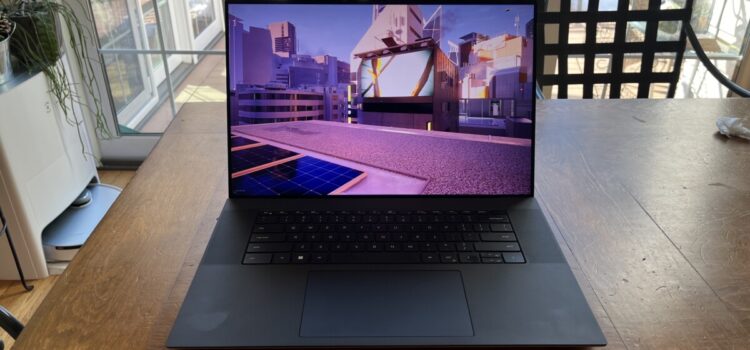
Dell XPS 15 (2025): Premium Windows model offering superb display (4K OLED), strong GPU and compact design—ideal for designers who want power without gamer‑look aesthetics.
-
Apple MacBook Pro 16‑inch (2025): For creatives in the Apple ecosystem, this machine offers top performance, excellent display quality, and strong studio app support.
-
ASUS ROG Zephyrus G16 (2025): A hybrid gaming/creator model—with high refresh display, strong GPU and CPU—great when your workflows include animation, motion design or even casual gaming.
-
HP Spectre x360 16 (2025): A convertible 2‑in‑1 option with touchscreen, pen support and color‑accurate display—strong for illustrators, UX/UI designers and creators who value flexibility.
How to Choose Based on Your Workflow
-
If you edit 4K/8K video, do color‑grading or motion graphics: prioritize GPU power, 4K display, high RAM/storage.
-
If you design visuals, photos or run Illustrator/Photoshop: look for color‑accurate display, good CPU and SSD, portability if you move around.
-
If you do 3D modeling, CAD or animation: go for a desktop‑class GPU, strong cooling, lots of RAM and storage.
-
If you illustrate, UX/UI or need pen input: consider a 2‑in‑1 convertible, touch/pen support, strong display and moderate GPU.
-
If you travel often or work on the go: choose balance—good display + decent GPU, but lighter build and battery life matter more.
Frequently Asked Questions (FAQs)
Q1: Do creators really need a dedicated GPU in 2025?
Yes—especially if you’re doing video editing, animation, 3D modelling or multi‑layer Photoshop workflows. Integrated graphics may suffice for light tasks but will slow down complex tasks.
Q2: How important is display colour accuracy for designers?
Very. If you’re working for print, digital publishing or colour‑critical work, a display with wide gamut (100% sRGB / DCI‑P3), good calibration and high resolution ensures your work looks correct across devices.
Q3: Can I pick a lighter, cheaper laptop and still do design work?
Yes—but be realistic about what you’ll compromise: maybe less GPU power, fewer ports, no ultra‑high refresh display. For casual design and editing it’s fine; for professional workflows you’ll benefit from the stronger machine.
Q4: How long should a creator laptop last?
With good build and decent specs you should aim for 5–7 years. But in creation‑work the demands escalate fast (higher resolution, new software), so investing a bit more may pay off.
Q5: Is MacBook or Windows better for designers?
Both have merits. If you’re in Apple ecosystem and use apps optimised for macOS, MacBook is excellent. If you need wide software compatibility, GPU‑power, diverse ports and upgradeability, Windows machines offer more flexibility. Your choice should match your workflow and tool‑chain.
Conclusion
For creators and designers in 2025, the right laptop is more than hardware—it’s a partner in creativity, ideation and production. Prioritising features like colour‑accurate displays, a strong GPU, fast storage, good build quality and workflow‑friendly ports will let your device keep up with your vision rather than hold it back. Whether you choose the ASUS ProArt P16, Dell XPS 15, MacBook Pro 16‑inch or another model from the list, remember: the best laptop for you is the one that enables your creativity seamlessly. Invest thoughtfully, choose with your workflow in mind, and you’ll equip yourself to create work that truly inspires.