



Buying a laptop might seem simple — find one that looks good, fits your budget, and make the purchase. But the truth is, many beginners make costly mistakes when buying their first laptop. The wrong choice can lead to frustration, poor performance, and wasted money. In this complete 1000-word guide, we’ll walk you through the most common laptop buying mistakes and show you how to make a smart, long-lasting decision.
Understanding Your Needs Before You Buy
One of the biggest mistakes people make is jumping into buying a laptop without first understanding what they actually need it for. Not all laptops are made for the same purpose. A gaming laptop is very different from a lightweight work notebook or a student Chromebook. Before spending your money, take a moment to think about how you’ll use your device daily.
If you’re a student or a writer, you may only need a budget-friendly model with good battery life and a comfortable keyboard. But if you’re editing videos, programming, or running design software, you’ll need more processing power and RAM. By clearly identifying your needs, you can narrow your options and avoid paying extra for features you’ll never use.
Ignoring the Processor and RAM Specifications
Many beginners look only at the brand or price of a laptop and completely overlook the processor and RAM — the two most important factors that determine speed and performance.
A weak processor can make even basic tasks like browsing the web or opening files painfully slow. In 2025, aim for at least an Intel Core i5, AMD Ryzen 5, or Apple M3 processor for balanced performance. If your budget allows, going for higher models like Core i7 or Ryzen 7 will future-proof your device for a few more years.
RAM is equally critical. Don’t settle for less than 8GB of RAM if you plan to multitask or use demanding apps. For power users or professionals, 16GB is ideal. Always check whether the RAM can be upgraded later — some ultra-thin laptops have soldered memory that can’t be replaced.
Choosing Based Only on Looks or Brand
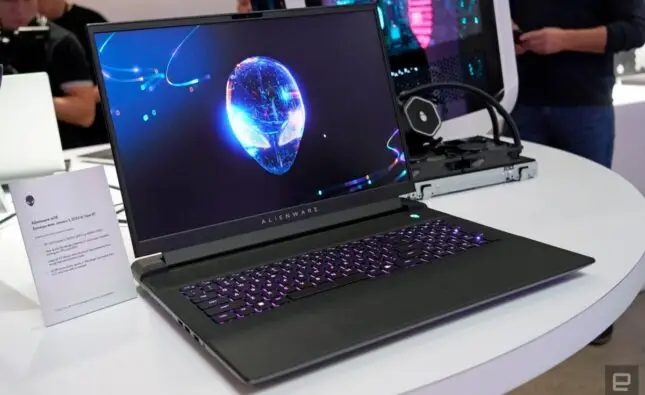
There’s no denying that a sleek, thin, metallic laptop can look impressive. However, looks can be deceiving. Many people buy laptops based purely on design or brand reputation, only to find that they overpaid for poor performance.
Apple, Dell, HP, and Lenovo are all great brands — but even within these companies, some models perform better than others. Always read reviews, compare specifications, and make sure the laptop matches your intended use. Don’t buy a premium laptop just for its logo or fancy finish; functionality should always come first.
Ignoring Screen Quality and Resolution
Another common mistake is focusing only on size rather than screen quality. A larger display isn’t always better if it lacks brightness, color accuracy, or resolution.
For most users, a Full HD (1920×1080) resolution is the sweet spot — it offers sharp visuals without draining battery life. If you work with visuals or edit photos and videos, consider higher resolutions like QHD or 4K.
Also, check whether the screen is matte or glossy. Matte screens reduce glare and are better for outdoor use, while glossy screens deliver more vivid colors but can reflect light, making them hard to use under bright conditions.
Forgetting About Battery Life
A powerful laptop is useless if it constantly needs to be plugged in. Many beginners overlook battery performance, which is one of the most crucial factors for students, travelers, or remote workers.
Before purchasing, check reviews and manufacturer ratings for real-world battery life. A good laptop should last at least 7–10 hours on a full charge for typical daily tasks. Remember, high-performance gaming or editing laptops often sacrifice battery life for power, so choose based on your lifestyle.
Not Checking Port Availability
Modern laptops are getting thinner, which means fewer ports — but that can create big problems if you need to connect external devices.
Before buying, make sure the laptop includes essential ports like USB-A, USB-C, HDMI, headphone jack, and an SD card slot (if you use cameras or media devices). If you rely on peripherals like external monitors, a mouse, or a keyboard, having the right ports can save you from constantly carrying adapters.
For ultimate flexibility, USB-C and Thunderbolt ports are ideal since they support charging, data transfer, and display output all in one.
Overlooking Storage Type and Capacity
Storage affects both performance and usability. Beginners often make the mistake of buying laptops with traditional HDD (Hard Disk Drives), which are slower and more fragile.
For 2025, you should only consider laptops with SSD (Solid State Drive) storage. SSDs are much faster, more reliable, and significantly improve boot and loading times.
As for capacity, 256GB is the minimum recommended for most users. If you store a lot of media files or install large applications, 512GB or more is ideal. Always check if the laptop allows adding extra storage later.
Not Considering Keyboard and Trackpad Comfort
A powerful laptop won’t feel enjoyable if it’s uncomfortable to use. The keyboard and trackpad are the parts you’ll interact with most, so comfort and build quality are key.
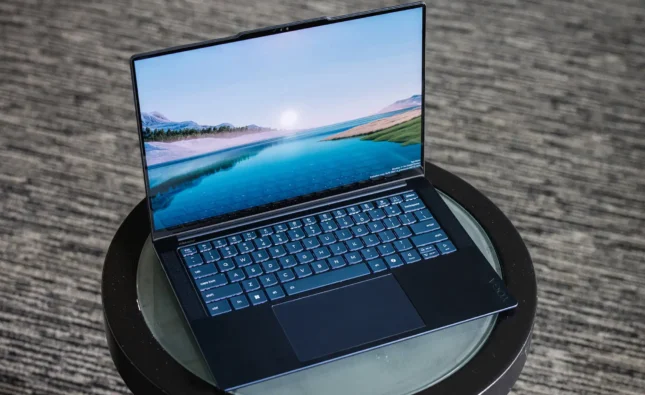
Make sure the keyboard has good key travel, spacing, and backlighting if you often work in dim environments. The trackpad should be responsive and accurately register gestures. If possible, test them in-store or read detailed user reviews before buying.
Ignoring Upgradability and Repair Options
Some modern laptops are sealed tight — you can’t upgrade RAM, replace storage, or even change the battery. That may not be a problem right now, but it limits long-term flexibility and repairability.
When buying, check if the model allows easy upgrades or repairs. Choosing a laptop with accessible components can save money later when you want to extend its lifespan instead of buying a new one.
Falling for Unnecessary Features
Laptop brands often market flashy extras like touchscreen displays, 4K screens, or dedicated GPUs to attract buyers. But these features can quickly raise the price without benefiting your actual use case.
If you only need your laptop for studying, writing, or streaming, a simple non-touch, Full HD laptop with good battery life is more practical than an expensive feature-packed model. Focus on what adds real value to your workflow, not marketing buzzwords.
Frequently Asked Questions
Q1: How much should a beginner spend on a good laptop?
For most beginners, a budget of $500–$900 can get you a reliable laptop for everyday tasks. If you need it for creative or professional use, expect to spend $1,000 or more for better performance.
Q2: Is buying a used or refurbished laptop a good idea?
Yes, if it comes from a trusted source with a warranty. Refurbished laptops can offer excellent value, but make sure the battery, storage, and keyboard are in good condition.
Q3: How often should I replace my laptop?
A well-maintained laptop typically lasts 5–7 years. You might upgrade sooner if your workload increases or newer software demands more power.
Q4: Should I buy Windows, macOS, or ChromeOS?
It depends on your needs. Windows laptops offer the most flexibility, macOS is great for creative professionals, and ChromeOS is ideal for light tasks and web-based use.
Q5: Is it better to buy in-store or online?
Online deals are often cheaper, but in-store purchases let you test build quality, keyboard comfort, and screen quality before buying.
Conclusion
Buying a laptop is a big investment, and making the wrong choice can affect your daily productivity and satisfaction. By avoiding common mistakes — such as ignoring specs, prioritizing looks over performance, or overlooking battery life — you’ll be more confident in choosing the right machine for your needs. Always research, compare models, and read verified reviews before purchasing. A thoughtful choice today ensures you’ll have a reliable, efficient laptop for years to come.